
Some days, you have a paragraph to write. On others, finding one word for how you feel is enough. The best journaling apps for emotional healing make room for those differences: Day One offers open-ended writing, Daylio favors brief mood check-ins, and Apple Journal offers suggestions for getting started. None can promise recovery, and your journal does not need a polished story to be useful.
- Day One leads the best journaling apps for emotional healing for people who want open-ended writing and photo entries.
- Daylio suits brief mood and activity check-ins; Five Minute Journal suits guided gratitude reflection.
- Journey suits cross-device journaling; Apple Journal suits people who prefer an Apple-built option.
- Journaling supports personal reflection, but an app does not replace counseling or urgent support.
Make room for the day you actually had
You do not need to write beautifully to keep a useful journal. You need somewhere to express what happened, how you felt, and what you want to understand better.
The wrong format creates friction: a blank page can feel overwhelming, while fixed prompts can leave too little room for a complicated day. Choose the format you can use honestly, not the one that makes your entries look impressive.
New Beginnings offers counseling for emotional healing through in-office and telehealth sessions. If you want support beyond private reflection, explore New Beginnings. A journal can hold observations you choose to discuss; it does not have to become an assignment.
What makes the best journaling apps for emotional healing?
For this 2026 guide, the strongest choice is the app that fits your way of reflecting. These criteria matter more than decorative themes or a long feature list:
- Entry format: Choose open writing, brief mood check-ins, or guided prompts according to what feels approachable.
- Room for mixed feelings: Your journal should let you acknowledge disappointment alongside gratitude, rather than pressure you into positivity.
- Low-friction use: Think about whether you actually want to type, tap, add pictures, or answer questions.
- Privacy fit: Review access controls, sharing settings, permissions, and the current privacy policy before saving sensitive details. The National Institute of Mental Health’s guidance on mental health technology identifies privacy and uncertain effectiveness as concerns when evaluating apps.
- Review usefulness: Consider how you will find an earlier entry or look back at something you want to discuss.
- Device fit: Confirm support for your device and any syncing or export features you need before committing.
No app earns a higher place here because it claims to improve your mental health. The ranking matches familiar journaling formats to distinct needs; it is not a clinical effectiveness ranking.
Best journaling apps at a glance
| App | Best for | Standout feature | Key limitation |
|---|---|---|---|
| Day One | Open-ended writing | Written entries with photos | An open page requires you to choose the direction |
| Daylio | Brief mood check-ins | Mood and activity logging with little typing | Mood labels cannot explain the whole situation |
| Journey | Cross-device journaling | Journal access across supported devices | You need to check platform-specific features |
| Apple Journal | An Apple-built journal | Suggestions that help you start an entry | Device and operating-system requirements matter |
| Five Minute Journal | Guided gratitude | A recurring morning-and-evening reflection format | Gratitude prompts are not enough for every difficult experience |
1. Day One: best journaling app for open-ended writing
Day One is a digital journal for written entries, with support for adding photos. It suits people who want to tell the story of a day instead of reducing it to a mood label.
Best for: People who process experiences by writing in their own words. You can use an entry to describe a conversation, record something meaningful, or work out what you wish you had said.
The strength is flexibility. The limitation is the same: Day One supplies a place to write, but you still decide where to begin and when to stop.
Day One pros:
- Open-ended entries leave room for complicated or conflicting feelings.
- Photos let you preserve context without describing every detail.
- The format accommodates both short observations and longer reflections.
Day One cons:
- A blank entry can feel demanding when you are tired or overwhelmed.
- Unstructured writing does not automatically help you move beyond repeating an upsetting event.
Try starting with one clear observation rather than a full account of your day. For example, describe what felt difficult, then identify what you needed in that moment.
Verdict: Buy into Day One's open-writing format if telling the story helps you understand it; skip it if you want prompts to lead.
2. Daylio: best journaling app for brief mood check-ins
Daylio combines mood tracking with activity logging, so you can make an entry without writing a long passage. Its format puts a quick check-in ahead of a full narrative.
Best for: People who want to notice feelings and daily activities with minimal typing. This is a practical alternative when opening a blank journal feels like another task.
Treat the record as a starting point for curiosity. Logging a difficult mood alongside an activity does not prove that the activity caused the feeling.
Daylio pros:
- Mood selection gives you a clear starting action.
- Activity logging records context alongside feelings.
- Brief entries remove the expectation of writing a polished paragraph.
Daylio cons:
- A mood category can flatten an experience that contains several emotions.
- Logged patterns do not establish causes or provide a diagnosis.
If an entry feels incomplete, add a short note about the context. A tiring workday and a painful disagreement might receive the same mood label while meaning very different things to you.
Verdict: Buy into Daylio's check-in format if low-effort recording matters most; skip it as your only journal if you need detailed storytelling.
3. Journey: best journaling app for cross-device reflection
Journey provides digital journaling across supported devices. It belongs on your shortlist if you want to record a thought on one device and return to your journal elsewhere.
Best for: People whose writing routine moves between devices. Before choosing Journey, check that your particular devices support the features and access arrangement you need.
Convenient access also deserves a privacy decision. Think about where you will open the journal, especially if you use a shared computer or leave a device accessible to others.
Journey pros:
- Cross-device access supports writing in different settings.
- Open-ended entries let you choose the subject and depth.
- A digital journal keeps reflections together rather than scattered across separate notes.
Journey cons:
- Features and requirements need checking for each platform you intend to use.
- Access from more devices creates more places where you need to manage privacy.
Choose Journey for an actual device need, not an imagined perfect routine. If you only write on your phone, cross-device access does not need to determine your decision.
Verdict: Buy into Journey's cross-device approach if you will use it; skip this priority if one writing device is enough.
4. Apple Journal: best journaling app for an Apple-built option
Apple Journal offers a place to write reflections and uses journaling suggestions to help you begin. It fits readers who want to explore Apple's own journaling approach before choosing a separate service.
Best for: People with a supported Apple device who want help finding an entry topic. Check current device and operating-system requirements rather than assuming every Apple device supports the same experience.
A suggestion is an invitation, not an obligation. You can write about something ordinary, ignore a suggested memory, or leave a topic alone when revisiting it feels unhelpful.
Apple Journal pros:
- Suggestions provide a starting point when you do not know what to write.
- Written reflection leaves space for your own interpretation.
- An Apple-built option gives existing Apple users a clear place to start their comparison.
Apple Journal cons:
- Compatibility requirements limit who can use it.
- A suggested moment is not necessarily the experience you most want to explore.
Review permissions before enabling features connected to personal information. Choose settings deliberately rather than treating the initial setup as something to rush through.
Verdict: Buy into Apple Journal's suggestion-led format if it suits your supported device; skip it if compatibility or cross-platform needs rule it out.
5. Five Minute Journal: best journaling app for guided gratitude
Five Minute Journal uses a structured morning-and-evening reflection format centered on gratitude and daily reflection. It offers direction when deciding what to write is the main obstacle.
Best for: People who prefer recurring questions over an empty page. Familiar prompts can give your writing a clear boundary without requiring a new topic each time.
Gratitude does not require you to call a painful situation good. You can appreciate a supportive conversation while still feeling hurt, angry, or uncertain about the rest of your day.
Five Minute Journal pros:
- Recurring prompts reduce the need to invent a writing topic.
- Morning and evening reflections provide distinct moments to pause.
- A structured format suits readers who prefer a defined task.
Five Minute Journal cons:
- Gratitude-focused prompts leave some difficult experiences insufficiently explored.
- Repeated questions can feel restrictive if you want varied, open-ended writing.
Leave room elsewhere for feelings that do not fit the prompt. Completing a gratitude entry is not a requirement to feel better afterward.
Verdict: Buy into Five Minute Journal's guided format if direction helps; skip it as your only outlet when you need more emotional range.
How the apps are ranked
This 2026 ranking prioritizes a clear match between the app's format and your needs. Day One is the default for open writing; the other choices address different obstacles: typing effort, device access, starting ideas, and prompt structure.
The order does not establish that one app produces better emotional outcomes than another. Choose by the task you want help doing, not by a promise that journaling will heal you.
Make your journal useful without making it another obligation
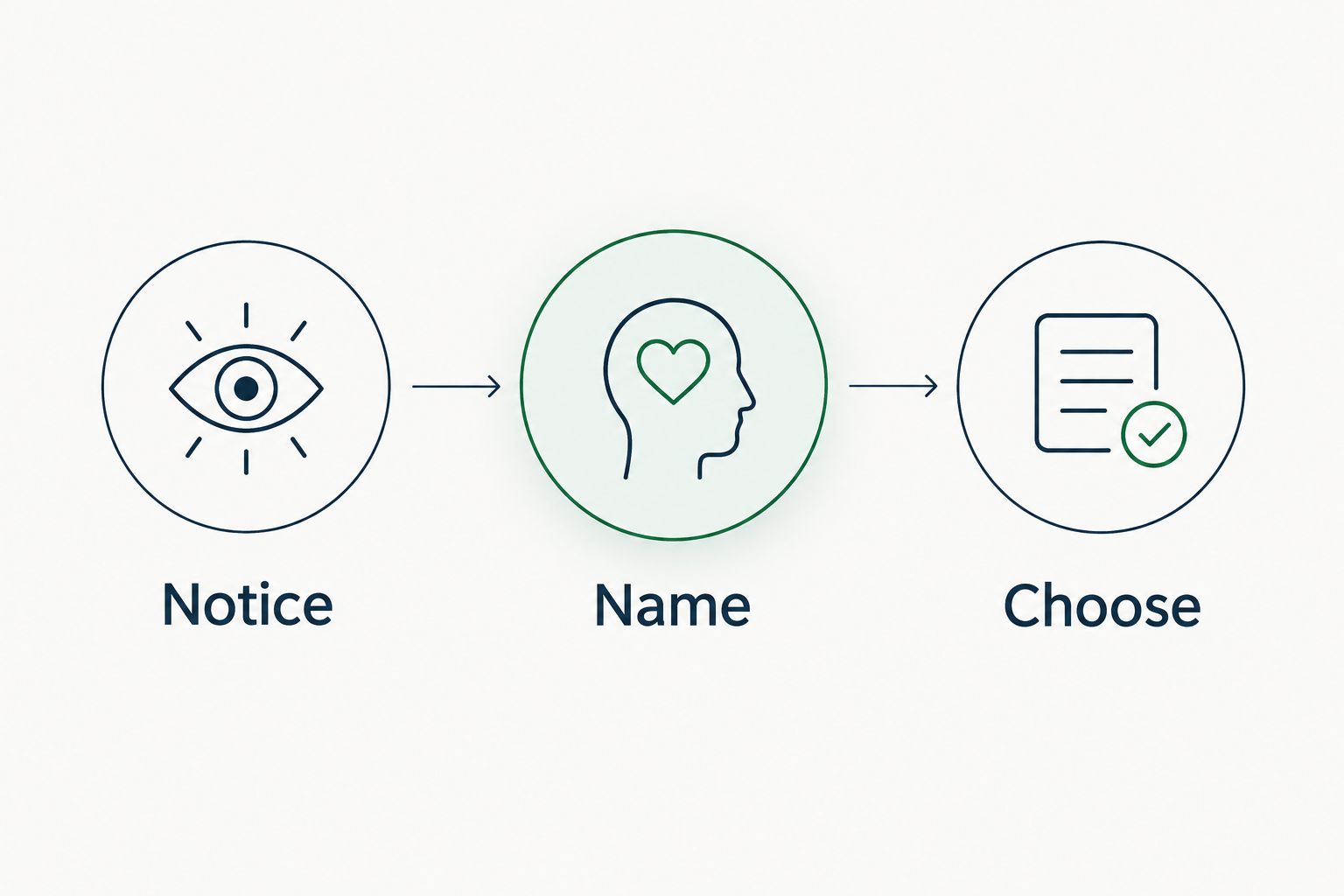
Start with an optional 2-minute check-in, not a demanding daily commitment. Use these 3 prompts when you need a boundary for your writing:
Notice
Describe what happened in plain language. Separate what you observed from what you assumed another person meant.
Name
Write 1 sentence about the feeling or need you can identify. You do not need to choose the perfect word, and more than one feeling can be true.
Choose
Identify a next step within your control, or decide to pause. That step might be resting, asking for support, or bringing a question to counseling.
If writing leaves you increasingly distressed, stop rather than pushing to finish. You can choose a neutral topic, close the app, or seek support; completing an entry is not more important than your well-being.
New Beginnings provides counseling for emotional healing and personal growth, with in-office and telehealth sessions. If you choose to bring journal material into counseling, a brief summary is enough. You do not have to share the entire journal.
Explore counseling support
Learn about in-office and telehealth counseling for emotional healing and personal growth.
Which journaling app should you choose?
Choose Day One as the default in 2026 if you want room to write freely. Choose Daylio when a short mood check-in is more approachable, Journey when supported-device access matters, Apple Journal when suggestions suit your Apple setup, or Five Minute Journal when recurring prompts help you begin.
Before moving sensitive entries into any app, check its current privacy information and how to export or delete your writing. Do not assume that every feature described in an older review remains unchanged in 2026.
FAQ
What's the best journaling app for emotional healing?
Day One is this guide's default for open-ended reflection, while Daylio suits brief mood check-ins. The best fit depends on how you prefer to record experiences, not on a claim that an app can provide healing.
Is Daylio better than Day One for understanding my feelings?
Daylio is better suited to brief mood and activity logging; Day One is better suited to detailed written reflection. Choose the format that lets you describe your experience without making journaling feel burdensome.
Can a journaling app replace therapy?
A journaling app does not replace therapy or urgent support. New Beginnings offers in-office and telehealth counseling for people seeking emotional healing and personal growth.
What if gratitude journaling makes me feel worse?
You do not have to continue a gratitude prompt that feels dismissive or upsetting. Try describing your experience without looking for a positive lesson, or pause and discuss the reaction with a counselor.
How long should I spend writing in a journal?
There is no required writing duration for this guide's approach. Try an optional 2-minute check-in and stop earlier if continuing feels unhelpful; that is a practical starting suggestion, not a treatment schedule.
Are journaling apps private enough for sensitive thoughts?
Privacy depends on the app, its current policies, your settings, and who can access your device. Review permissions, account access, sharing, and deletion options before recording information you want to keep private.
Should I show my counselor everything in my journal?
You can choose what to share with your counselor. A summary, a question, or an entry you select can start the conversation without handing over your whole journal.
Your journal does not need a positive ending
Choose your stopping point before you open the app. For your next entry, decide whether you want to name a feeling, preserve a memory, or prepare a question, rather than resolve your whole life on a screen.
Keep that standard in 2026: a useful journal makes room for your experience. It does not require a streak, a polished story, or a positive ending. If you would rather talk than write alone, request a consultation with New Beginnings to explore support that fits your needs.