
Between class, assignments and everything waiting on your phone, even taking a pause can start to feel like another task. A mindfulness app should make that pause easier. Headspace offers guided instruction, Calm emphasizes bedtime listening, Insight Timer allows more choice, and UCLA Mindful offers guided practices. The useful choice is the format you feel comfortable returning to, not the app with the longest menu.
- Headspace leads the best mindfulness apps for college students who want structured, guided meditation.
- Calm fits bedtime listening; Insight Timer fits students who prefer choosing their own meditation practice.
- UCLA Mindful fits students who want guided body-awareness practice without an entertainment-focused approach.
- Mindfulness apps support personal practice; they do not replace individual counseling or urgent mental health care.
An app gives you something to practice independently. If you want a conversation about what you are experiencing, New Beginnings offers in-office and telehealth counseling for emotional healing and personal growth.
A pause should not feel like another assignment
College life creates different reasons to pause: you might want a transition after class, something quieter before bed, or a way to notice tension while studying. Those needs do not require the same app.
Choose a practice you can use in your actual surroundings. A meditation that requires quiet headphones time will not fit every shared room, campus commute, or crowded afternoon. Your setting matters as much as the instructor's voice.
This guide compares formats, not proven differences in treatment outcomes. The National Institute of Mental Health cautions that mental health apps vary in evidence and privacy practices. None of these recommendations means an app will improve your grades, resolve emotional distress, or replace professional care.
What makes the best mindfulness apps for college students?
Use these criteria before comparing names. The right choice should reduce the effort of beginning, not add another task to manage.
- Clear guidance: You should understand what to do without learning specialized terminology first.
- A distinct purpose: Choose support for starting meditation, winding down, practicing independently, or noticing physical sensations.
- Manageable choice: A large library helps when you enjoy exploring. A narrower starting point helps when browsing becomes avoidance.
- Campus practicality: Consider headphones, interruptions, shared spaces, and whether you can sit comfortably where you are.
- Personal comfort: Voices, music, silence, and attention to breathing feel different to different people. You do not have to force a poor fit.
- Appropriate boundaries: A mindfulness app provides exercises and content, not a personal assessment of your mental health.
Before committing in 2026, review the app's current description and privacy information. Check what information you would share, what permissions it requests, and how you can manage your account. Do not assume that a wellness label answers those questions.
Best mindfulness apps at a glance
| App | Best for | Standout feature | Key limitation |
|---|---|---|---|
| Headspace | Guided beginners | Structured meditation courses | A course-led approach is less suited to students who mainly want silent practice |
| Calm | Bedtime listening | Sleep Stories and guided meditations | Listening to a story is not the same activity as practicing mindfulness |
| Insight Timer | Self-directed practice | Meditation timer and a broad teacher library | Choosing among teachers and sessions takes effort |
| UCLA Mindful | Body awareness | Guided body-scan meditation | A focused practice format is not an entertainment library |
The order reflects a starting recommendation, not a claim that one app is clinically better than another. For 2026, Headspace is the default for a student who wants guidance; the other choices fit more specific preferences.
1. Headspace: best mindfulness app for guided beginners
Headspace offers guided meditation and structured courses that introduce mindfulness practice. It gives a beginner a sequence to follow rather than requiring them to assemble a routine from unrelated recordings.
That structure is its main reason to lead this list. If you keep searching for the right meditation instead of beginning one, a course-based approach gives you a clearer next step.
Headspace pros
- Guided instruction explains what to pay attention to during a session.
- Courses give your practice a sequence rather than a collection of disconnected starts.
- A consistent instructional format makes comparison-shopping between recordings less necessary.
Headspace cons
- Following a course is a poor match if you mainly want a silent timer.
- A guided voice does not automatically suit your listening preferences.
- Completing lessons can become another achievement task if you focus on progress rather than the practice itself.
Best for: Students who are new to meditation and want someone to explain the next step.
Start with one introductory practice rather than building a queue of courses. Afterward, ask whether the instruction made sense and whether you would willingly return to it. You do not need to feel completely relaxed for the session to have been a useful introduction.
Verdict: Choose Headspace for a guided starting point; skip it if spoken instruction gets in your way.
2. Calm: best mindfulness app for bedtime listening
Calm includes guided meditations, Sleep Stories, and relaxing audio. Its clearest use case in this comparison is giving you something quieter to listen to as you prepare for bed.
Keep the distinction between its formats clear. A story can be an enjoyable bedtime activity without being the same thing as deliberately noticing your breathing, thoughts, or surroundings.
Calm pros
- Sleep Stories provide a narrative alternative to another round of scrolling.
- Guided meditations offer a separate option when you want an attention-based exercise.
- Different audio formats let you choose between listening to a story and following meditation instructions.
Calm cons
- A bedtime listening habit does not automatically become a daytime mindfulness practice.
- Stories and background audio are unnecessary if you only want direct meditation instruction.
- Finding a narrator you enjoy can take some comparison.
Best for: Students who want bedtime audio and also want meditation content in the same app.
Choose the activity before opening Calm: story, meditation, or background listening. That small decision keeps your bedtime routine from turning into an extended search through audio choices.
If sleep difficulties are persistent or affect your daily functioning, discuss them with a qualified healthcare professional rather than treating an app as the entire response.
Verdict: Choose Calm for bedtime listening; skip it if your priority is a straightforward meditation course.
3. Insight Timer: best mindfulness app for self-directed practice
Insight Timer combines a meditation timer with guided recordings from different teachers. It suits students who want to select a voice, explore approaches, or practice without continuous spoken guidance.
The timer is the important distinction here. You can set aside space to practice without turning every session into another piece of content to consume.
Insight Timer pros
- The timer supports practice without ongoing narration.
- Different teachers give you room to find an instructional style that feels comfortable.
- Guided and self-directed formats let you choose how much instruction you want.
Insight Timer cons
- A broad library creates more decisions before you begin.
- Different teachers use different language and approaches, so sessions do not necessarily form a sequence.
- Silent practice provides less direction when you are unsure what to do with wandering attention.
Best for: Students who already know their preferred practice or enjoy choosing among teachers.
Create a small personal starting set: a familiar guided recording and a timer setup. Return to those before exploring more. The point is to make starting easier, not to build the longest saved list.
If you find yourself repeatedly changing recordings, switch to a familiar one rather than assuming another search will produce the perfect session.
Verdict: Choose Insight Timer for control over your practice; skip it if too much choice stops you from starting.
4. UCLA Mindful: best mindfulness app for body awareness
UCLA Mindful provides guided mindfulness practices, including body-scan meditation. A body scan directs attention toward sensations in different areas of the body rather than asking you to follow a story.
This format fits students who want a concrete focus for attention. You are noticing what is present, not trying to produce a particular emotion or force every muscle to relax.
UCLA Mindful pros
- Body-scan guidance gives attention a specific place to return.
- Direct instruction suits students who prefer practice over entertainment.
- A defined exercise makes it easier to identify what you are trying during a session.
UCLA Mindful cons
- Focusing on bodily sensations is not comfortable for everyone.
- A focused meditation format does not serve the same purpose as bedtime stories.
- Recorded guidance cannot respond personally if an exercise brings up discomfort.
Best for: Students interested in noticing physical sensations through guided practice.
You can sit in a supported position and keep your eyes open if that feels more comfortable. Stop the recording if you become distressed; finishing an exercise is not an obligation.
Body awareness is an option, not a requirement for mindfulness. If attention to your body feels unhelpful, choose a different focus rather than pushing through.
Verdict: Choose UCLA Mindful for guided body awareness; skip body scans when that focus feels uncomfortable.
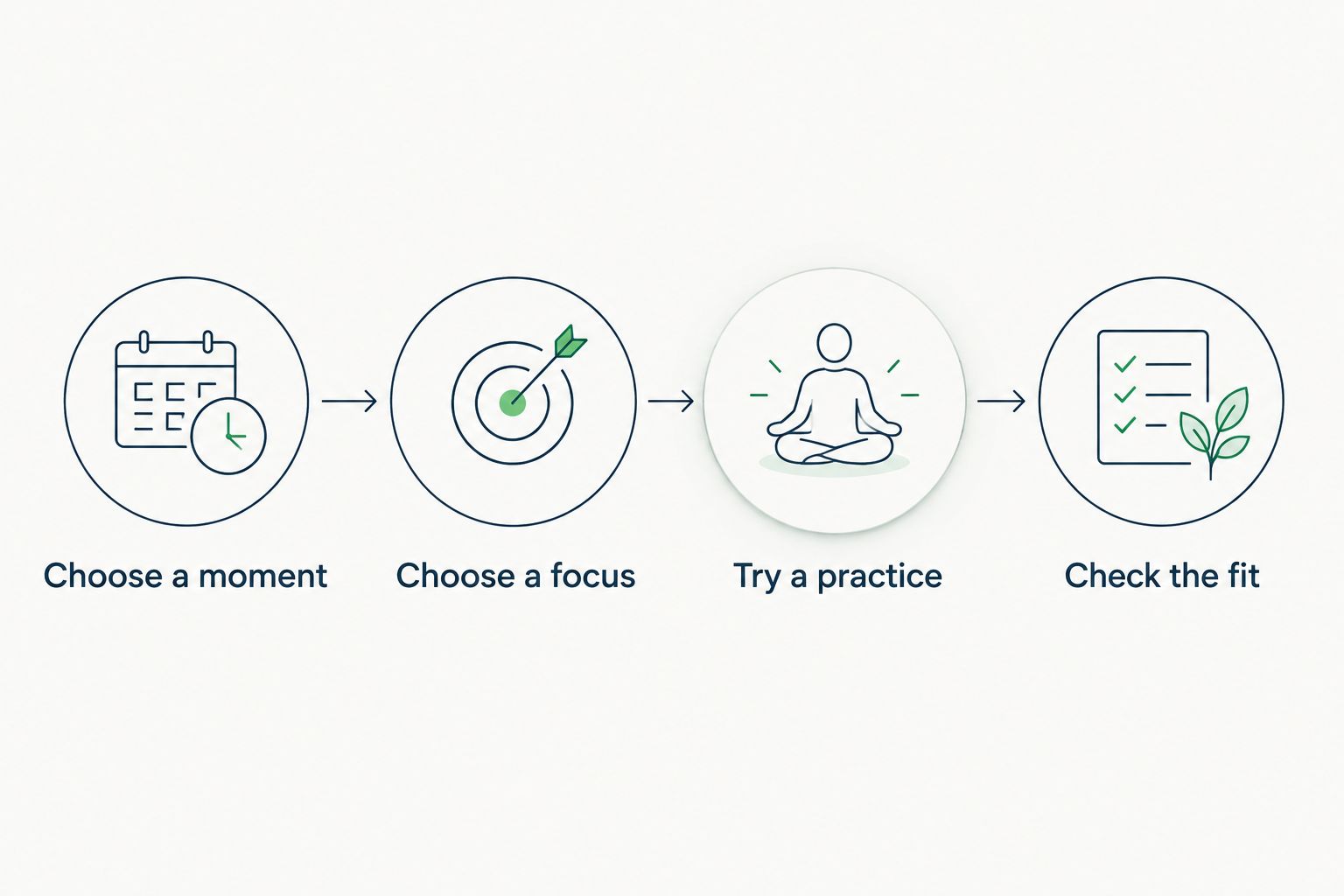
How to fit mindfulness into a college day
A useful routine starts with a situation you recognize. Choose one ordinary moment rather than expecting an app to fit every difficult part of your week.
Choose a moment
Pick a transition: after returning from class, before opening study materials, or while settling down for the evening. Use a moment you already encounter instead of designing an entirely new schedule.
Choose a focus
Decide whether you want guided instruction, quiet practice, bedtime listening, or body awareness. Match that decision to the app comparison above. You do not need to rotate through every format.
Try a practice
Set aside 2 minutes for an initial trial if starting feels difficult. If you prefer more room, reserve 5 minutes or 10 minutes in your schedule; these are planning suggestions, not required session lengths or promises of benefit.
Follow the recording's instructions while keeping your own comfort in view. Pause when interrupted, and stop if the exercise feels distressing.
Check the fit
Ask whether you understood the guidance, felt comfortable enough to continue, and would use the format again. A busy mind does not by itself mean you chose badly. An unpleasant voice or confusing instructions are clearer reasons to try something different.
How the apps were ranked
The 2026 ranking prioritizes clear guidance, a distinct use case, manageable choice, campus practicality, personal comfort, and appropriate boundaries. Headspace leads because its structured courses offer a clear starting path for beginners.
Calm, Insight Timer, and UCLA Mindful follow because each serves a different preference. This is an editorial comparison of formats and features, not a clinical trial, a student survey, or a claim that one app produces better mental health outcomes.
Which mindfulness app should you choose?
Choose Headspace if you are undecided and want guided instruction. Choose Calm when bedtime listening is your main goal, Insight Timer when you want more control, and UCLA Mindful when guided body awareness interests you.
For your 2026 routine, start with one app rather than treating this list as a download checklist. Switching makes sense when you can name the mismatch: too much narration, too many choices, an uncomfortable focus, or the wrong activity for your goal.
New Beginnings is an option for students who want counseling rather than app-only support. Its in-office and telehealth counseling services address a different need: talking with a professional about your own experiences, healing, and growth.
Explore counseling support
Learn about in-office and telehealth counseling for emotional healing and personal growth.
FAQ
What's the best mindfulness app for a college student who has never meditated?
Headspace is the strongest starting choice in this guide for students who want structured, guided instruction. Choose a different format if the voice or course-based approach does not feel comfortable.
Is Calm better than Headspace for college students?
Calm is the better fit for bedtime listening, while Headspace is the better fit for a structured introduction to meditation. Choose according to the activity you want rather than assuming one app is better for every student.
Which mindfulness app should I choose if I prefer silence?
Insight Timer is the clearest fit in this comparison because it includes a meditation timer. Self-directed practice gives you less spoken guidance, so beginners should decide whether that level of independence suits them.
What is UCLA Mindful best for?
UCLA Mindful is a useful choice for guided body-awareness practice, including body scans. Stop or choose another focus if paying attention to bodily sensations feels uncomfortable.
How long should I try mindfulness between classes?
You can reserve 2 minutes for an initial trial when your schedule is tight. That is a practical starting suggestion, not a minimum effective duration or a promise of a particular result.
Can a mindfulness app replace counseling?
A mindfulness app does not replace individual counseling or urgent mental health care. New Beginnings offers in-office and telehealth counseling for people seeking emotional healing and personal growth.
What if meditation makes me feel worse?
Stop the exercise if it increases distress. You do not have to close your eyes, focus on breathing, or complete a body scan; discuss difficult reactions with a qualified mental health professional.
Leave room for something other than an app
A quiet mind is not a prerequisite for mindfulness. Noticing that your attention wandered and returning to your chosen focus is part of the practice, not evidence that you failed.
Before your next session, decide what will count as enough: opening the familiar recording, following a short practice, and checking how it felt. Let that be a point of care in your day, not another assignment to perfect. If you would rather talk with someone about what has been weighing on you, request a consultation with New Beginnings.